Apple School Manager.
The easiest way to set up Apple devices.
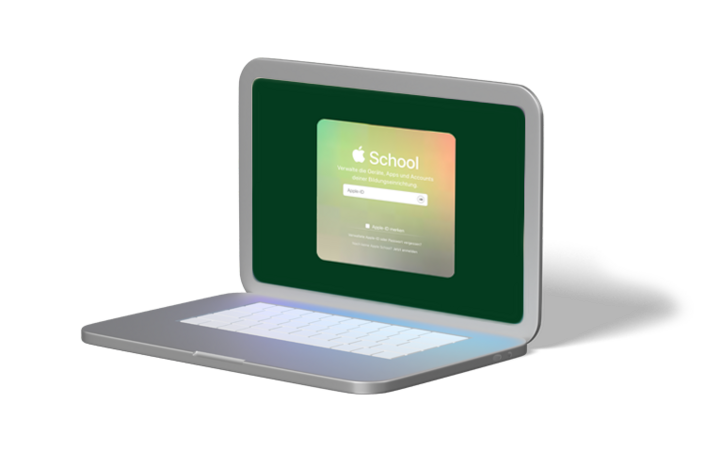
Easy to set up.
With Apple School Manager and JAMF Pro™ for schools, you can quickly and easily set up new Macs, iPads, or iPhones from a central location and make them available to users.
Apple School Manager.
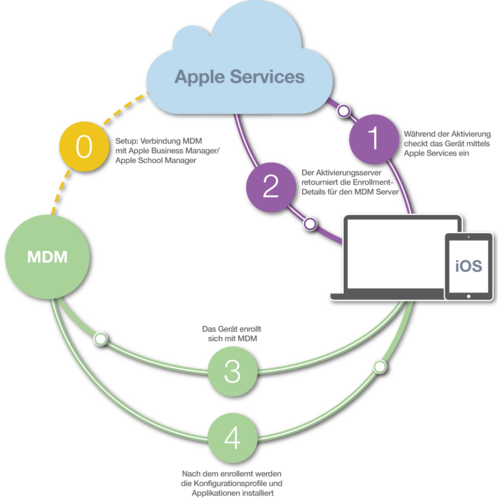
Apple School Manager and JAMF Pro™ go beyond simple MDM (Mobile Device Management) capabilities, offering fully automated device registration and configuration, as well as simplified setup for users.
With Apple School Manager, device registration becomes a simple process for both the IT department and the users. Apple School Manager saves time for everyone involved in the registration and deployment of a new device. This allows users to get started immediately and use productive applications and content, with management and guidance ensured from the start.
Apple School Manager is a service from Apple. Schools can register with Apple for the program and register their devices. JAMF™ enables IT administrators to define registration settings, configuration profiles, and setup experiences for their users before the devices are deployed.

JAMF School™ – Mobile Device Management for the education sector.
JAMF School™ is based on the features of ZuluDesk. It is a Mobile Device Management (MDM) solution specifically developed for the education sector. Thanks to the intuitive web-based user interface, the deployment, inventory, and security of Macs, iPads, and iPhones is easier than ever before. With JAMF School™, you can easily deploy and manage Apple devices – the best technology for learning – allowing you to focus on your core tasks.
You can easily create and manage users, user groups, and device groups. You can view detailed information and perform diagnostics for individual devices.
MDM.
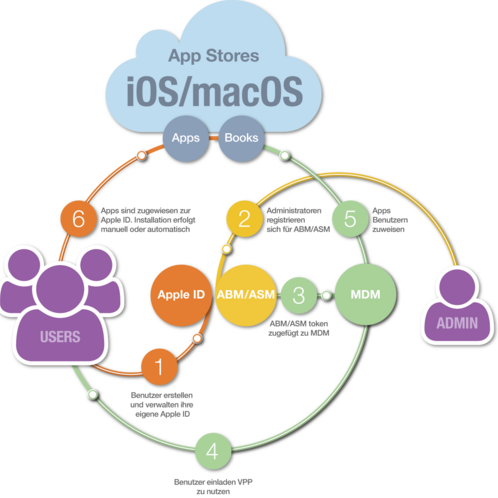
MDM (Mobile Device Management) can be integrated into Apple School Manager to make app distribution easier than ever.
- Users receive the required software on all their devices
- IT administrators have a simple workflow for software distribution
- The purchase and software inventory are centralized and standardized
- Schools can save money by maintaining licenses and redistributing apps as users come and go

FileWave.
With FileWave's Multi Platform Management, you receive a comprehensive solution for the deployment and management of your computers and mobile devices. The software is cross-platform for workstations (Apple macOS and/or Microsoft Windows) and mobile devices (Apple iOS and/or Android).
- System installation (macOS or Microsoft Windows)
- Connection to your directory (Active Directory or Open Directory)
- Setting up the administrator user
- Customization of the user template (user environment)
- Installation of the software (Adobe Photoshop, Microsoft 365, WoodWing, etc.)
- Printer configuration
Volume licenses (formerly VPP).
The volume licensing program allows you to purchase apps in large quantities and then distribute them to devices via your MDM. Credits for this can be purchased directly from us.